
Free download, installation in minutes, integrated Pix, and the entire platform in the palm of your hand. No hassle, no fees.
The 70bet app is available for Android and iOS. Choose below and follow the step-by-step installation guide.
APK directly for Android smartphones and tablets. Compatible with the vast majority of devices available in Brazil.
Native app for iPhone and iPad. Compatible with iPhone 7 or later, without freezing or draining your battery.
Prefer not to install anything? Access 70bet.pw from your mobile browser and enjoy the same full experience, without taking up storage space.
In a country where mobile phones are the primary device for internet access, it makes perfect sense that 70bet has invested in a robust and well-developed app for Android and iOS. The download is free, the file is lightweight, and installation takes less than two minutes — even on phones with modest processors, which is the reality for a large share of users outside major cities.
The difference between using the installed app and accessing via browser goes beyond speed. With the 70bet on your phone, you receive real-time notifications about live games, time-limited promotions and alerts about activity on your account. This direct connection to the platform is difficult to replicate in a conventional browser.
Secure download: The 70bet APK file is distributed exclusively from our official website. Be wary of third-party links or WhatsApp groups offering alternative versions of the app — always download from the official page.
On Android, the 70bet app installation is done via APK — a direct installation file that does not require an app store. The operating system may ask whether you want to allow installation from external sources: simply confirm in your phone's security settings, which are usually found under Settings > Security > Unknown sources or something similar depending on the version and manufacturer.
After granting permission, simply tap the downloaded file and confirm the installation. The 70bet will appear on your home screen or in the app list as normal. From there just open it, log in or create your account, and the entire lobby is available on your phone screen.
For iPhone and iPad users, the download and installation process for the 70bet app follows specific instructions available on the download page — which guide you step by step based on the iOS version installed on your device. The app is compatible with iOS 13 or later, covering the vast majority of active iPhones in Brazil today.
The iOS experience is equally optimized: the interface adapts to the iPhone screen dimensions without losing quality or functionality. Face ID and Touch ID can be used for quick account authentication, eliminating the need to enter your username and password on every login.
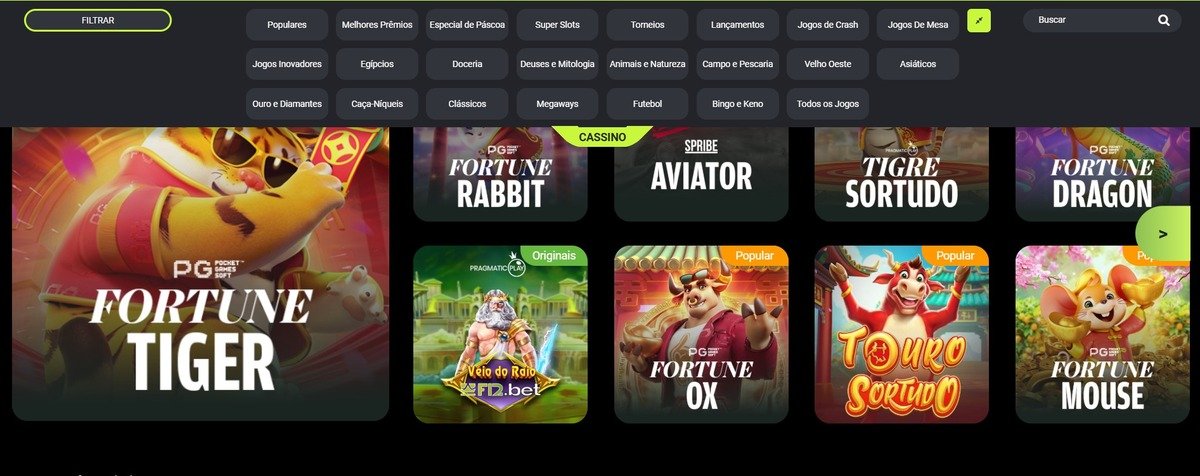
Right after installation and login, the player has access to everything the 70bet platform offers: the game lobby complete with hundreds of slots, the live casino with real dealers streamed in HD, sports betting on the Brasileirão, Libertadores and Copa do Brasil, as well as table games and esports.
Navigation in the app is organized into intuitive tabs and menus that take you straight to what you're looking for without any hassle. The search bar in the lobby lets you find any slot or game by name in seconds. And access to your wallet — for deposits via Pix, boleto bancário, or card — is always visible in the top corner of the screen.

A very common question is whether the 70bet app works well on a standard 4G connection — without fiber or high-speed Wi-Fi. The answer is yes. The app was developed with data optimization in mind: images load progressively, smart caching reduces consumption in repeated sessions, and slot games open within seconds even on a moderate signal.
For the Live Casino, which depends on real-time video streaming, we recommend a more stable connection — preferably 4G+ or Wi-Fi — to ensure image quality stays in HD without buffering. Even with standard 4G, the experience is satisfactory in most cases.
For sports betting and lobby browsing, data usage is very low. A user who spends 30 minutes in the app placing sports bets will rarely consume more than 20–30 MB of data — a very reasonable figure for anyone on a limited data plan.
The 70bet app receives regular updates that bring performance improvements, new games in the lobby, and occasional security fixes. On iOS, updates are managed automatically if that option is enabled in iPhone settings. On Android, the app automatically checks for a new version when opened and offers a one-tap update option.
Keeping the app updated is important not only to access new features, but also to ensure your gaming experience is as stable as possible. Updates are downloaded in the background and generally do not interrupt an ongoing game session.

Security is a priority across every layer of the 70bet app. All communications between the app and the platform's servers are protected by SSL/TLS encryption, ensuring that your login credentials, personal information, and financial transactions never travel exposed over the network.
Beyond end-to-end encryption, the app offers two-factor authentication (2FA) for an extra layer of account protection. If suspicious access is detected, the system automatically blocks the attempts and notifies the user. You can also terminate all active sessions from the account settings menu within the app itself.
Your personal data is handled in accordance with our Privacy Policy, in compliance with the General Data Protection Law (LGPD). We never share your information with third parties without your consent.
Responsible Gaming: The 70bet app includes control tools — set deposit limits and session time limits in your account settings. Access more information at Responsible Gaming. Access is permitted only for users aged 18 and over.
Step-by-step guide to getting the 70bet app running on your Android in minutes.
Open your Android browser and go to 70bet.pw/download. You'll be on the right page to download the official APK.
Click the Android download button. Your browser will automatically start downloading the APK file.
If Android asks for confirmation to install apps outside the Play Store, go to Settings > Security and enable "Unknown sources" or "Install unknown apps".
Tap the downloaded APK file, confirm the installation and wait. Then open the 70bet app and log in or register.
Step-by-step guide to installing the 70bet app on iPhone or iPad.
Go to 70bet.pw/download via Safari — the default iOS browser. The process works better through Safari than other browsers on iPhone.
Click the iOS download button. Follow the on-screen instructions — the process may vary depending on your iOS version.
In some cases, iOS asks you to trust the developer certificate. Go to Settings > General > Device Management and confirm.
The 70bet icon will appear on your home screen. Open it, log in to your account or register for free, and start playing.
After installing, you get access to a complete digital entertainment experience.
The app launches in seconds even on mid-range phones.
Pix deposits and withdrawals integrated, available 24/7 without leaving the app.
Real dealers in HD straight to your phone, without freezing even on 4G.
Brasileirão, Libertadores, volleyball, and esports with live updated odds.
Live game alerts, promotions, and processed withdrawals.
Quick login with fingerprint or Face ID on compatible iOS and Android devices.
New app versions are installed in the background without interrupting your session.
Menus, notifications, and support fully in English.
Both ways of accessing 70bet work well — understand the differences to choose what makes the most sense for you.
| Feature | Installed App | Mobile Browser |
|---|---|---|
| Loading speed | Very fast | Fast |
| Push notifications | Yes | No |
| Biometric login | Yes | Limited |
| Storage space | ~50 MB | None |
| Live Casino in HD | Yes | Yes |
| Pix and payments | Yes | Yes |
| Automatic updates | In the background | Always up to date |
| Battery usage | Optimized | Varies by browser |
Straightforward answers to the most common questions about the installation process.
Free download, fast installation, integrated Pix. Everything you need to play the best of Brazilian digital entertainment.